

Advanced Graymail Protection
Overview
Gray/greymail is a class of high-volume, non-malicious messages, such as marketing emails, newsletters, and other subscription content, that can drown out important mail and reduce end-user productivity.
Sublime’s Advanced Graymail Protection helps customers identify and manage these messages by proactively classifying graymail during message analysis and supporting consistent remediation actions (for example, moving messages to a dedicated Promotions or Spam/Junk folder) across Microsoft 365 and Google Workspace.
Best PracticeSublime recommends routing graymail to a Promotions folder when available.
Promotions is intended for legitimate bulk mail, while Spam/Junk is designed for higher-risk or unwanted messages. Moving legitimate marketing messages to Spam/Junk may influence how your email provider treats future messages from the same sender. Organizations that prefer to use Spam/Junk for graymail can continue to do so.
Microsoft 365: If a Promotions folder doesn't already exist, the Move to Promotions Action creates one automatically. See Move to Promotions for details.
Automation
We've introduced a new Automation to handle graymail, routing messages to Promotions with the MQL:
type.inbound
and ml.attack_score().verdict == "graymail"
Along with the Automation, the core feed rule "Attack Score Flash: Advanced Graymail Detection" flags even more graymail with the beta.attack_score_flash() function. The Automation above implicitly includes beta.attack_score_flash().
End-User Preferences
Sublime's Advanced Graymail Protection is designed to reduce inbox clutter while ensuring users retain visibility and control over their email.
Managing Graymail Messages
Sublime learns from messages moved into or out of Promotions or Spam/Junk (and any sub-folders within them) only. Moving messages between other folders does not affect user preferences. Messages moved directly to Trash/Deleted Items do not create or update sender preferences.
If a user believes a message has been incorrectly placed, they can move it to another folder of their choice. Sublime remembers that preference for the individual user and automatically delivers future messages from the same sender to the preferred location. These preferences will be honored whether the message has a graymail verdict nor not (see FAQ for exceptions).
How Preferences Work
Sublime learns from user actions to personalize graymail handling over time.
- Preferences are specific to each individual user and do not affect other users in the organization.
- Preferences are applied based on the sender email address, not the sender domain. For example,
[email protected]and[email protected]are treated as separate senders. - Moving a message out of Promotions or Spam/Junk (and any sub-folders within either) creates or updates a preference to deliver future messages from that sender outside that folder.
- Moving a message into Promotions or Spam/Junk (and any sub-folders within either) creates or updates a preference to deliver future messages from that sender to that folder.
- Moving messages between other folders (e.g. Inbox to Updates) does not create or update preferences.
- Preferences only affect future messages and do not retroactively move messages that have already been delivered.
- Preferences will move all future messages from the sender, except when remediation Actions are applied (see “What takes priority” in FAQ).
- Messages moved directly from Promotions or Spam/Junk to Trash/Deleted Items do not create or update preferences.
How to Enable End-User Preferences
Enable End-User Preferences under Admin → Account.

RBAC for Managing User Preferences
| Category | Permission | Admin | Engineer | Analyst |
|---|---|---|---|---|
| End-User Preferences | manage_folder_routing | ✅ |
Please see the documentation on RBAC for more details.
Example End-User CommunicationHow to Manage Graymail Preferences
Sublime automatically sorts marketing emails, newsletters, and other bulk mail into a dedicated folder (such as Promotions or Spam/Junk) to help keep your inbox focused on what matters.
You're always in control. If a message ends up in the wrong place, simply move it into or out of Promotions or Spam/Junk. No additional work is needed. Sublime will remember that choice and automatically deliver future messages from the same sender to the same location.
A few things to know:
- Moving a message out of Promotions or Spam/Junk teaches Sublime to deliver future messages from that sender to the folder you moved it to.
- Moving a message into Promotions or Spam/Junk teaches Sublime to keep future messages from that sender there.
- Sublime only learns from messages moved into or out of Promotions or Spam/Junk (including sub-folders inside Promotions or Spam/Junk). Moving messages between other folders (for example, from Inbox to a custom folder) won't affect future delivery.
- Preferences are applied based on the sender email address, not the sender domain. For example,
[email protected]and[email protected]are treated as separate senders.- Changes apply to future messages only. Emails you've already received won't be moved.
- Moving a message directly to Trash/Deleted Items doesn't update your preferences.
Want to Change an Existing Preference?
If you want the messages back in Promotions or Spam/Junk, simply move the sender's message to Promotions or Spam/Junk.
If you've already taught Sublime to deliver messages to a folder and want to change that preference to another folder (not Promotions or Spam/Junk), you can move a message from that sender back into Promotions (or Spam/Junk), then move it from there to your new preferred folder. This updates Sublime's saved preference for future messages.
Gmail Mobile (iOS): If the Promotions Tab Is Missing
If your organization routes graymail to Promotions, you'll want to view those messages separately from your Inbox. On the Gmail iOS app, the Promotions tab may not be visible if inbox categories have been customized or disabled.
If you don't see the Promotions tab, follow these steps:
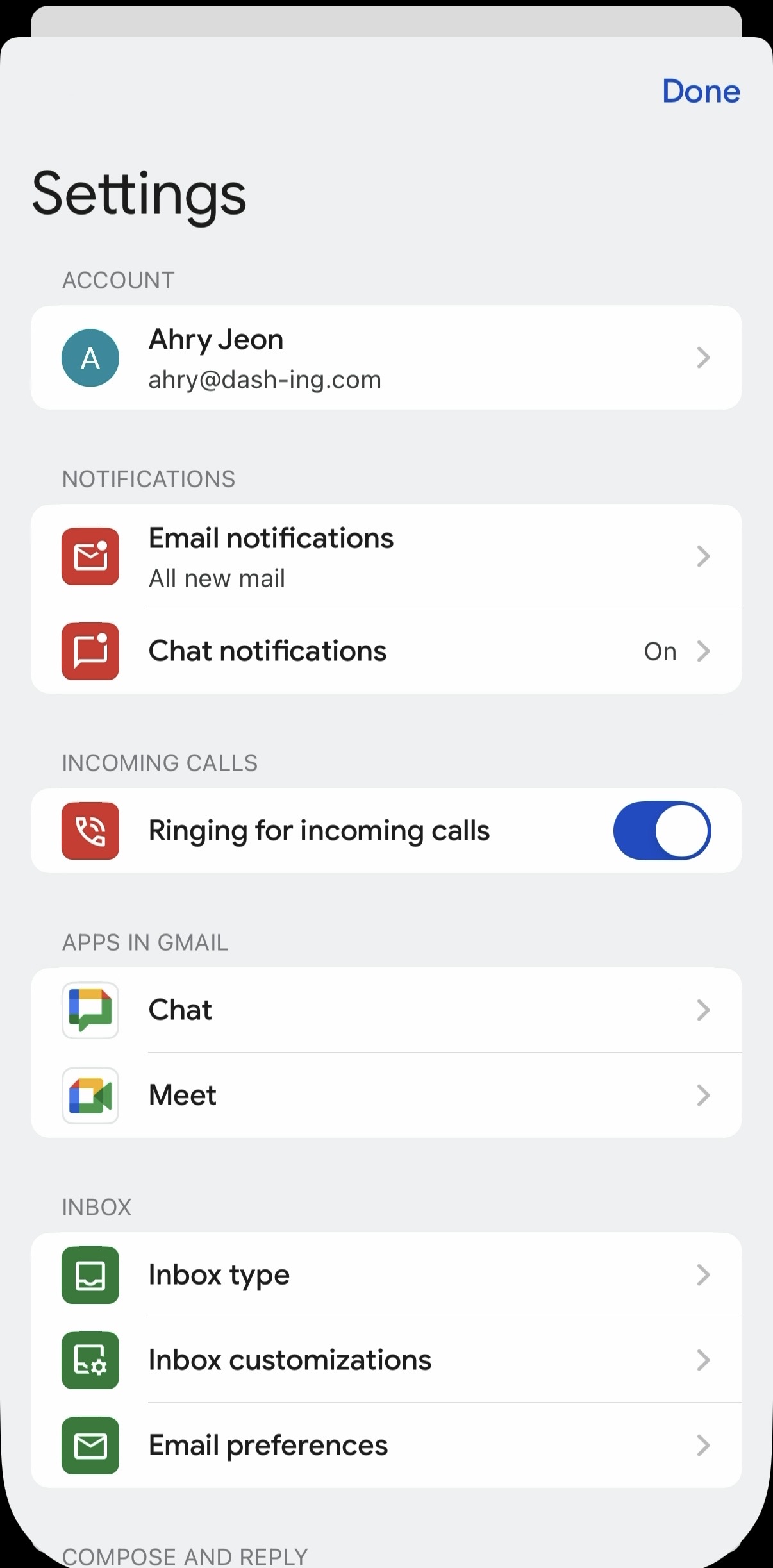
- Open the Gmail app and go to Settings. Under Inbox, tap Inbox customizations.
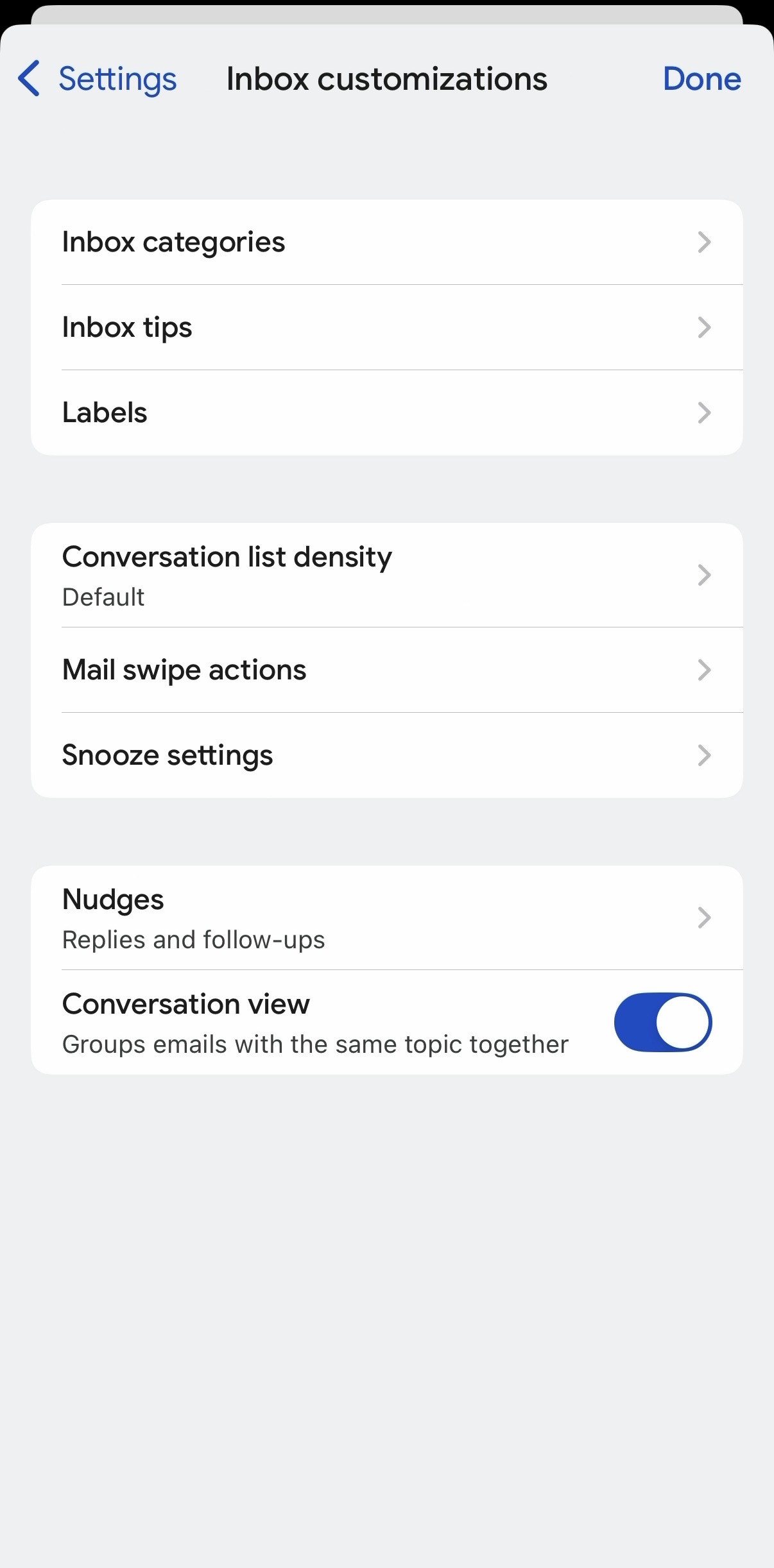
- Tap Inbox categories. If you don't see this option, your Google Workspace administrator may need to enable smart features for Google Workspace services.
- Turn on Promotions.
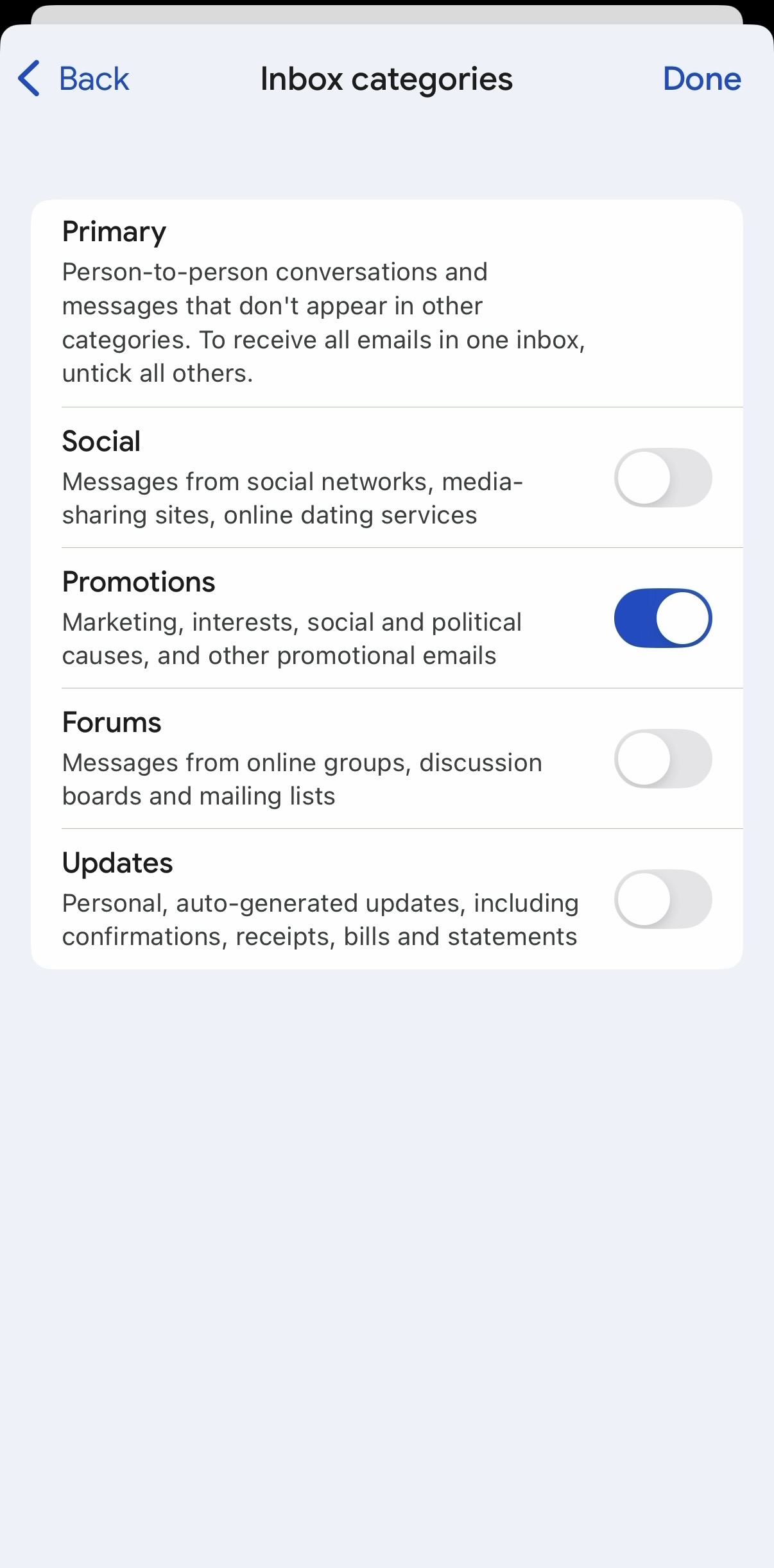
That's it!
Frequently Asked Questions
What takes priority — my learned preference or a Sublime Action?
Higher-severity Sublime Actions always take priority. Remediation Actions, such as Quarantine or Trash, take place on inbound messages regardless of any learned preference. For lower-severity handling such as Move to Spam or Move to Promotions, an end-user's learned preference wins: the message is delivered to their preferred folder.
How does this work alongside Microsoft 365 or Google Workspace's own spam filtering?
Routing is based on the sender for that specific user. It looks at your organization, mailbox, and the sender address, not the message's current folder. So if you've set a preference for a sender, future messages from that sender are delivered to your preferred folder. Your provider's own spam verdict is not part of Sublime's routing precedence. As above, a higher-severity Sublime Action (Quarantine or Trash) always takes priority over a learned preference.
I have an Outlook rule or Gmail filter for a sender, and also a Sublime preference. Which one wins?
Sublime applies its move just after delivery, after your provider's rules have run, so a Sublime preference generally determines the final placement.
Can I route messages to a nested or custom folder?
Yes.
But keep in mind that Sublime only learns from messages moved into or out of Promotions or Spam/Junk (and any sub-folders within them). Because of this, chaining moves through a custom folder won't update a preference. For example:
- You move a message from Promotions to Inbox/Nested-Folder-A. Sublime learns this and delivers future messages from that sender to Inbox/Nested-Folder-A.
- You then move that sender's message from Inbox/Nested-Folder-A to Folder-B. Because the message moved out of Inbox/Nested-Folder-A (a folder Sublime doesn't watch), this change is not saved.
Messages moved directly to Trash/Deleted Items also do not create or update a preference.
How do preferences work for shared mailboxes and delegates?
A move made in a shared mailbox creates a preference on that shared mailbox, which applies to everyone accessing it, not on the individual delegate's own mailbox. If two people file the same sender into different folders, the most recent change wins (there is one preference per mailbox and sender). Sublime does not attribute the change to a specific person, because provider change notifications don't identify who performed the move.
If an admin restores a message from quarantine, where does it go?
If a preference exists for that sender, the restored message is delivered to the user's preferred folder.
Updated 5 days ago