

CrowdStrike Falcon Sandbox
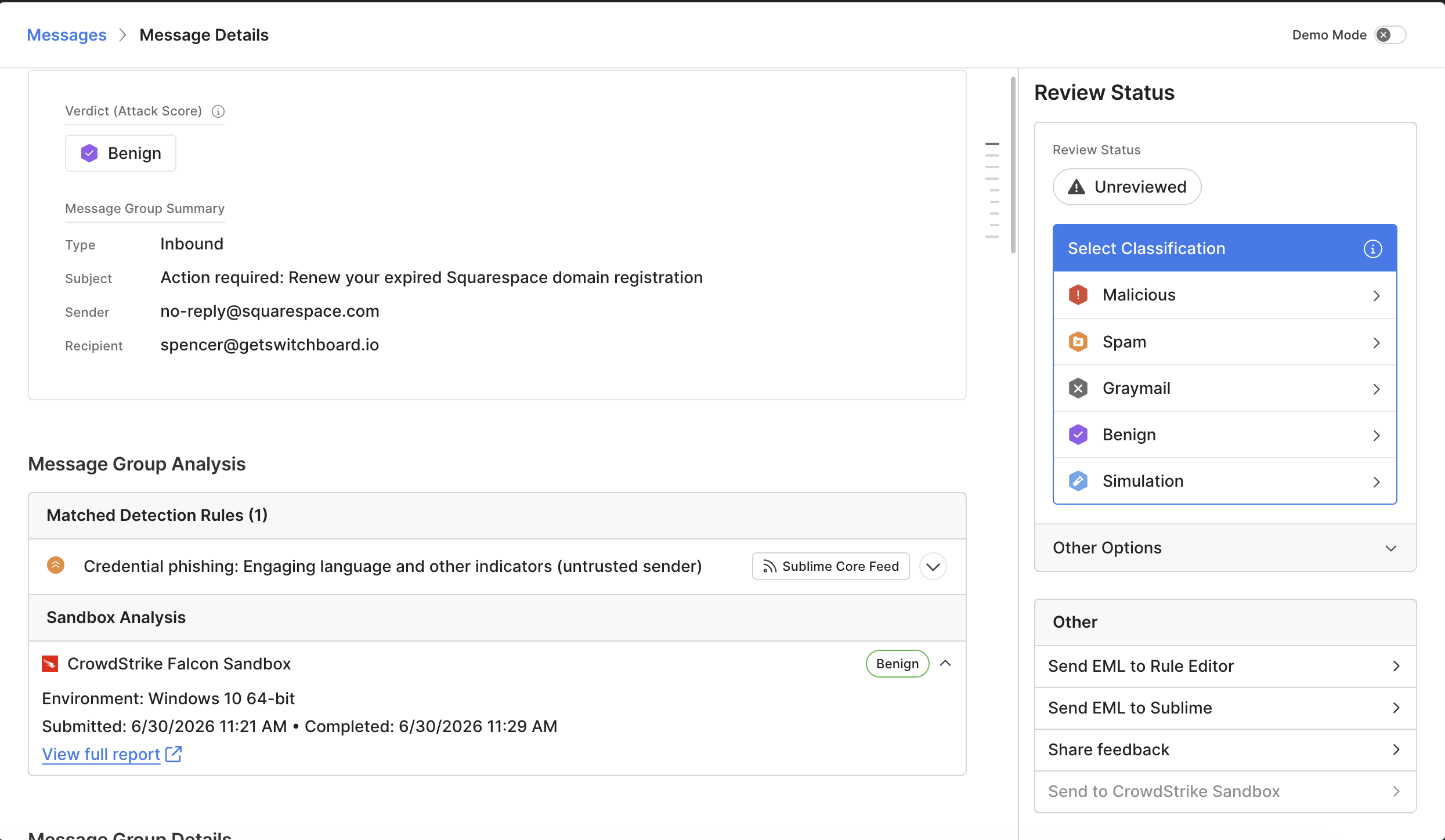
Connect Sublime to CrowdStrike Falcon Sandbox to allow analysts to detonate suspicious emails and attachments in Falcon on demand from any flagged message. Verdicts, scores, and a link to the full Falcon report appear inline in the message detail view.
This is a bring-your-own-key (BYOK) integration — submissions count against your CrowdStrike Falcon Sandbox quota, not a Sublime-provisioned one.
In this section
- Set up the integration — Create an API client in CrowdStrike Falcon, then connect it to Sublime under Account with your Client ID, Client Secret, Cloud Region, and Tenant URL.
- Submit EML files — Send a sample to the sandbox from any flagged message's action panel and track its progress through the Sandbox Analysis row in the MDV.
- Understand sandbox results — Interpret the verdict, confidence score, detonation environment, and timestamps Falcon returns, and learn how (and currently how not) this feeds into Sublime's detection logic.
- Troubleshoot the integration — Resolve common issues: the submit action missing from the MDV, submissions failing immediately, error states on a submission, or analyses that never complete.
Updated 5 days ago