

ADÉ: Autonomous Detection Engineer
Overview
ADÉ (Autonomous Detection Engineer) is an AI agent that turns missed attacks into new detection coverage, often within hours. The detections it creates only need to work in your environment, so ADÉ can close a specific gap quickly instead of waiting on a general-purpose update.
When you classify an unflagged message as malicious, spam, or graymail, or when ASA identifies one, ADÉ studies it, writes a Detection Rule in MQL that catches the pattern, backtests it against your real email, and hands you a recommendation to review. You can read the logic and its backtest results and approve it yourself, or let ADÉ auto-activate coverage that clears the precision bar you set.
When ADÉ runs
ADÉ generates coverage from confirmed misses: unflagged malicious, spam, or graymail messages that existing coverage should have caught but didn't. It can run two ways:
- Automatic: ADÉ receives missed messages automatically, either when you classify one as
malicious,spam, orgraymail, or when ASA hands one off. - Manual: an analyst clicks Trigger ADÉ on the message detail view.
When ASA identifies a confirmed miss, it can hand the message to ADÉ so a single report both cleans up the current attack and closes the gap that let it through.
How ADÉ works
- A confirmed miss reaches ADÉ. ADÉ starts from an unflagged
malicious,spam, orgraymailmessage that existing coverage missed. - ADÉ analyzes the attack. It references a frequently updated set of reference Detection Rules and reviews your existing Rules, finds the patterns and techniques in the message, and decides what new coverage should look like.
- ADÉ writes the Rule. It generates MQL that describes the attack behaviorally, rather than pinning to brittle indicators like a single sender or file hash.
- ADÉ backtests it. ADÉ Hunts (searches your historical email, by default the last 14 days) across your active mailboxes and analyzes the results to judge whether the Rule is high quality.
- ADÉ iterates. It refines the MQL until the Rule fits the attack pattern in your environment, then scores it.
- ADÉ scores precision. It calculates a precision score from the dispositions of the message groups in its final Hunt: the share, as a percentage, whose disposition matches the Rule's target. For example,
75% malicious precisionmeans three of the four matched message groups had a malicious disposition. A small result set can inflate this number, so check how many groups matched. Auto-activation checks the score against the threshold you set. - ADÉ labels the coverage. It tags the recommendation by Attack Type, Tactics & Techniques, and Detection Methods, so it's clear what ADÉ caught and how it fits your coverage.
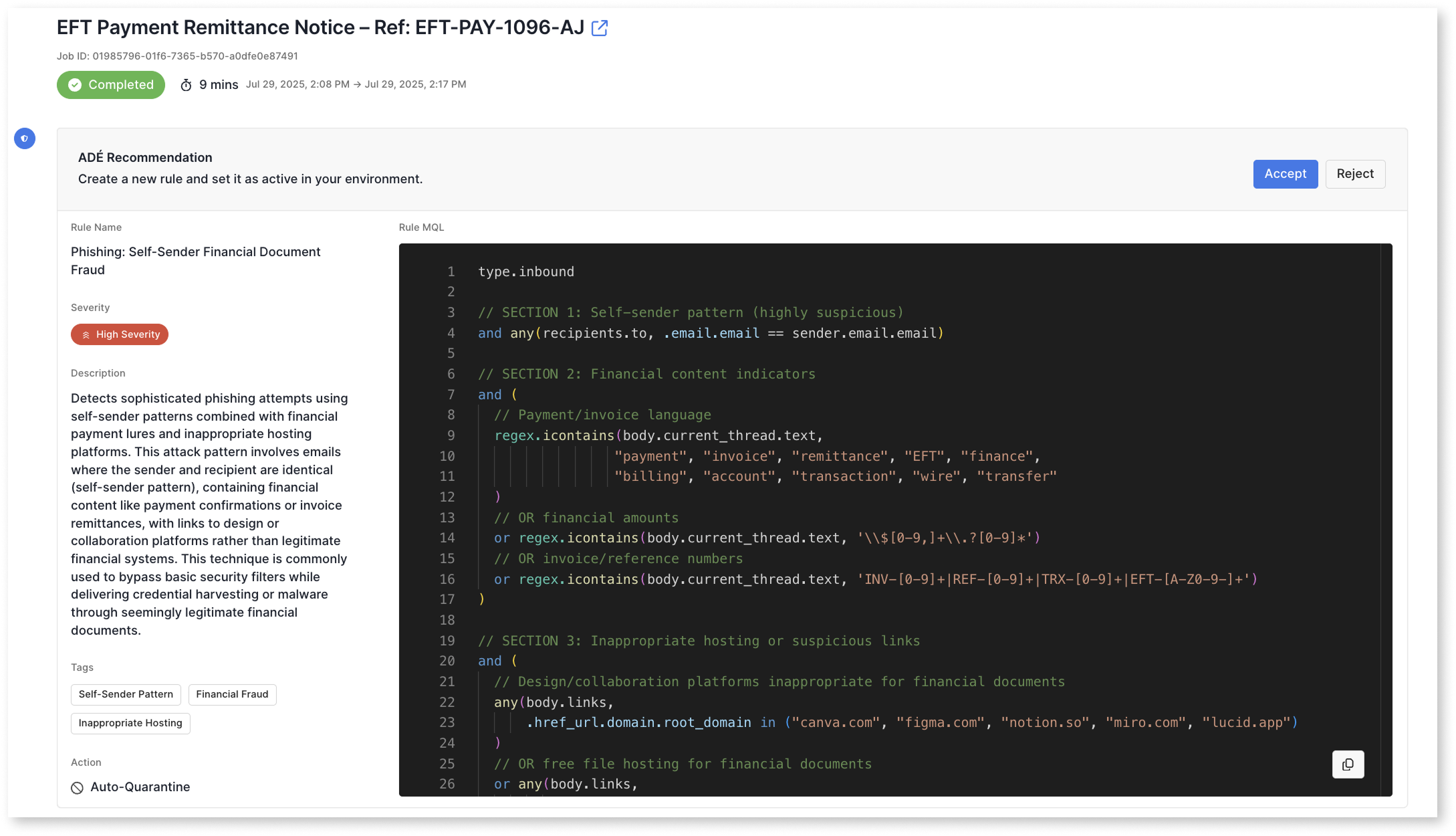
- ADÉ presents the recommendation: the proposed Rule plus the results of its final Hunt, ready for review.
- The Rule goes live. If you've enabled auto-activation and the precision score clears your threshold, ADÉ adds the Rule to your environment. Otherwise it waits for a human to approve. Analysts can cancel or restart jobs and leave review comments along the way.
ADÉ runtime depends on the size of your environment and how much historical email it backtests against. Many jobs finish within a few hours, though larger environments or broader backtests can take longer. You don't need to watch the job; ADÉ can alert you by webhook, Slack, or email when it's done.
Review and activation
By default, ADÉ recommends coverage for a human to approve before anything goes live. Analysts can inspect the proposed MQL and its Hunt results, leave comments, cancel or restart jobs, and approve or reject the recommendation. ADÉ writes the MQL for you, so analysts can review the recommendation and backtest results without writing MQL by hand.
ADÉ logs what it reviewed during coverage generation and shows its reasoning from the first analysis through each Hunt iteration, so its work stays auditable.
If you turn on auto-activation, you set the minimum precision score a Rule must clear to activate on its own (the preset is 99%); anything below it still routes to a human. An activated ADÉ Rule comes with a default remediation based on its verdict - a malicious Rule quarantines matching messages, for example - which you can change or remove like any other Rule. Keep the threshold high until you've seen how ADÉ performs in your environment, and roll back any Rule by opening it in your Detection Rules and deactivating or deleting it.
The ADÉ recommendation
Each ADÉ recommendation includes:
- Proposed Detection Rule: the MQL ADÉ generated
- Final Hunt results: the messages ADÉ matched while backtesting
- Precision score: the share of matched message groups whose disposition matched the Rule's target
- Reasoning summary: how ADÉ approached the miss and refined the Rule across Hunt iterations
- Labels: Attack Type, Tactics & Techniques, and Detection Methods
- Available actions: approve, comment, cancel, or restart — plus auto-activation when configured
Where ADÉ's Rules live
An activated ADÉ Rule appears in your Detection Rules list alongside your existing Rules and behaves like any other Rule. You can edit, tune, deactivate, or delete it. Its Attack Type, Tactics & Techniques, and Detection Methods labels make ADÉ-generated coverage easy to find and audit.
Getting started
In the dashboard, open Agents → ADÉ and select Enable ADÉ. ADÉ then generates recommendations for your review; it won't activate any Rule on its own unless you turn on auto-activation.
From there you choose how ADÉ gets its work:
- Automatic: ADÉ receives messages that existing coverage missed, either when you classify one as
malicious,spam, orgraymail, or when ASA hands one off. - Manual: send a message to ADÉ yourself with the Trigger ADÉ button on the message detail view.
Self-hosted AWS deployments need a one-time setup before ADÉ can run; your Customer Success Engineer can walk you through it.
Availability
ADÉ is included in Sublime Enterprise. Self-hosted deployments may incur per-report processing costs for using ADÉ; contact your Customer Success Engineer for details.
ADÉ runs in Sublime Cloud (SaaS) and supported self-hosted environments; reach out to your Customer Success Engineer for specific region requirements. In self-hosted deployments, ADÉ runs inside your own environment.
Your data is never used to train foundation models, and model providers don't retain it. ADÉ uses zero-retention model inference.
In supported regions, ADÉ inference is geo-pinned so requests stay within your region's geography, such as EU requests staying in the EU and US requests staying in the US. Some other regions may route inference outside the local geography, so if you have a specific residency requirement, confirm coverage for your region with your Customer Success Engineer.
Updated 9 days ago