

CrowdStrike Next-Gen SIEM
Set up the CrowdStrike Falcon Next-Gen SIEM integration
Overview
Steps for connecting Sublime to CrowdStrike Falcon Next-Gen SIEM, so your Sublime email security events are ingested into Falcon and can be investigated alongside your endpoint, identity, and cloud telemetry.
The integration is pull-based: CrowdStrike's Sublime Security connector authenticates to your Sublime instance with a Sublime API key and polls for new events every 5 minutes. The connector is built and published by CrowdStrike on the Falcon marketplace.
Setup has two parts in Falcon. First you create a configuration, which holds your Sublime base URL and API key. Then you create a data connection, which is what actually starts ingesting. A configuration on its own sends nothing.
When you create the connection you choose which endpoints to ingest from:
- SIEM events — flagged message groups, meaning every detection rule match including spam and graymail, plus user-reported messages.
- Audit log — Sublime audit events.
On first connection the connector backfills 30 days of SIEM events and 7 days of audit events. The shorter audit window is deliberate, since longer audit fetches are slow.
Each event carries key message metadata plus Sublime's ASA verdict. See What data does the integration send below for the full field list.
What data does the integration send
- Email messages — every flagged message group and user-reported message, each identified by a unique message group ID.
- Message details — subject, sender and sender domain, number of recipients, and first-seen / last-seen timestamps, number of messages in the group.
- Why it was flagged — the names of the Sublime detection rules that matched.
- Indicators — source IP addresses, URL links, and attachment names and hashes.
- User activity — link-click activity on the message's URLs (which links recipients clicked).
- Our verdict — detection based and AI Agent verdicts: Malicious, Suspicious, Benign, Spam, Graymail, or Unknown.
- Format — one combined JSON record per message group (all of the above merged together), delivered as a JSON Lines file. To stay within CrowdStrike NG-SIEM ingestion limits, very large groups or long lists of URLs may be truncated.
In short: for every flagged or user-reported email, we send its key metadata, the detection rules and indicators behind it, and our verdict, as one record per message group.
For JSON output samples, see API Docs - Get Message Group SIEM Summary and API Docs - Retrieve ASA Verdict
Requirements
- Permission to create a new API key in the Sublime platform
- A CrowdStrike Falcon tenant with Next-Gen SIEM and permission to onboard data
- The Sublime Security connector, published by CrowdStrike in the CrowdStrike Store
Sublime steps: generate an API key
- Sign in to your Sublime platform as an administrator.
- In the left-hand navigation, under Automate, select API.
- Click New Key.
- Give the key a descriptive name (for example,
CrowdStrike NG-SIEM). - Click Save.
- Copy the API key and store it securely. The key is shown only once; if you lose it, generate a new one.
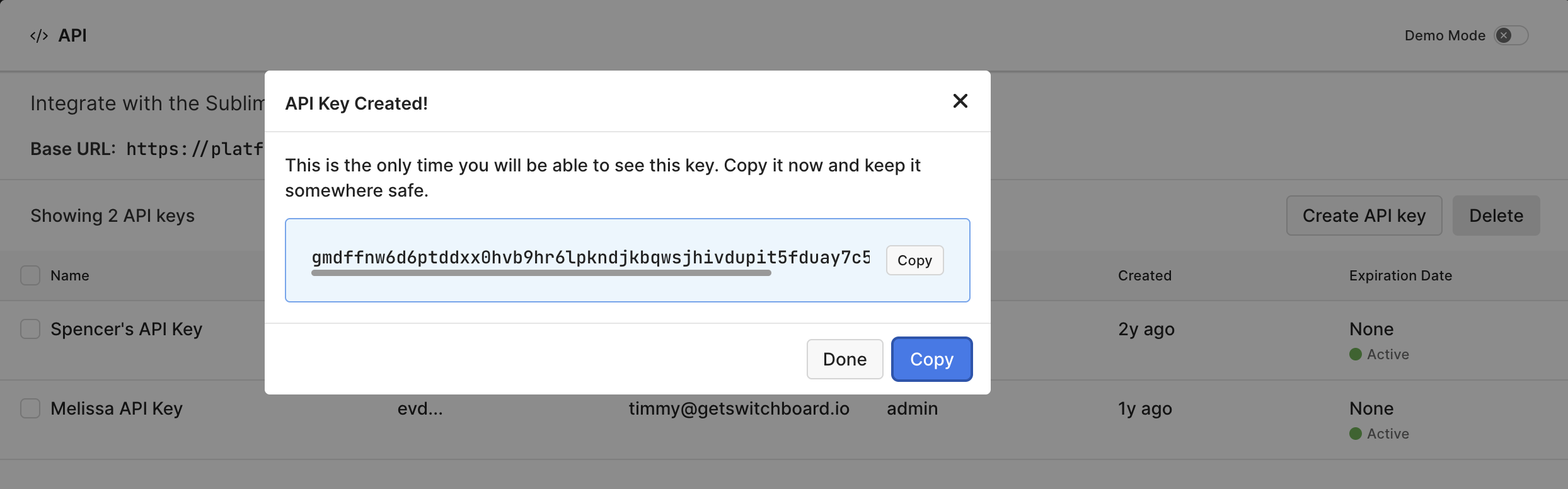
If you later rotate or revoke this key, update the connector in Falcon with the new key or events will stop flowing.
CrowdStrike steps: add the Sublime connector
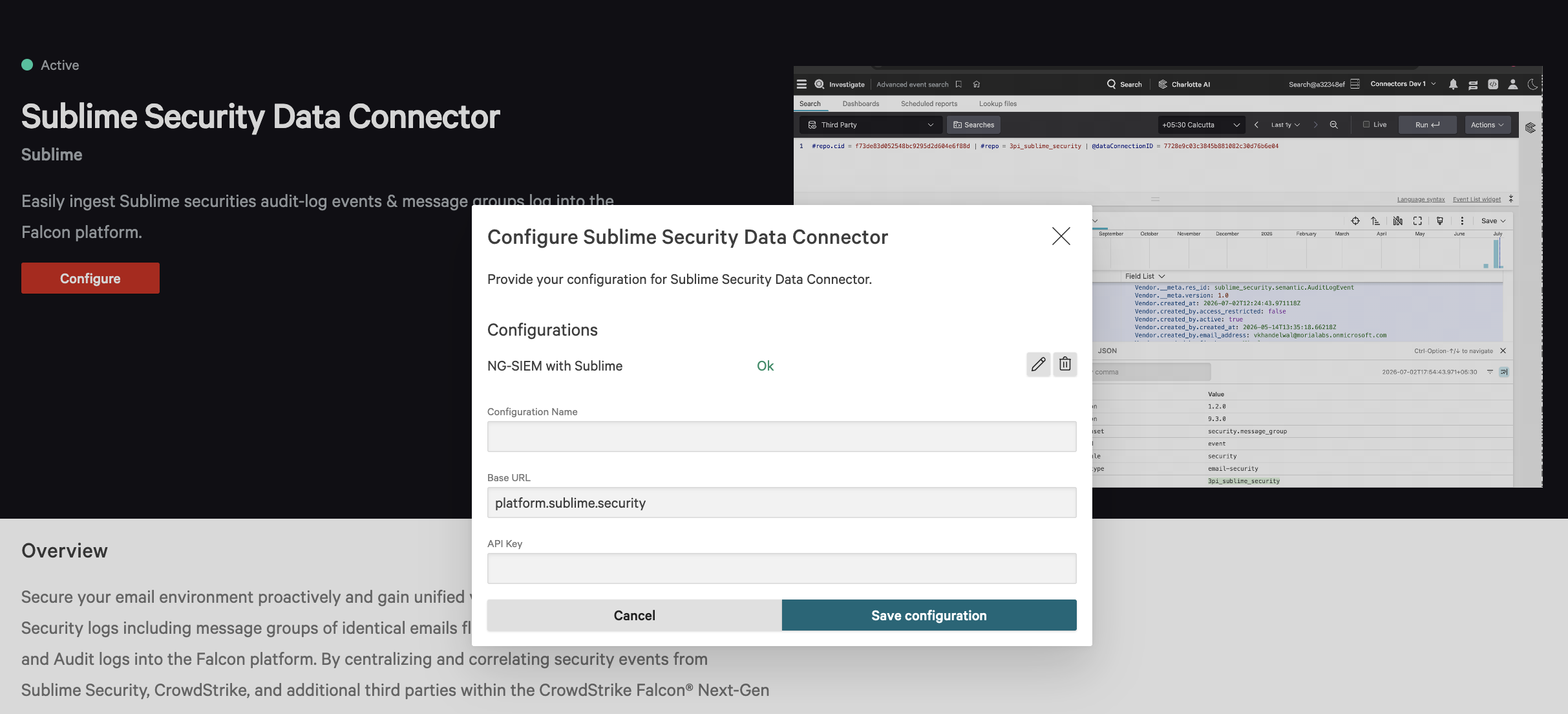
- In Falcon, go to CrowdStrike Store, search “Sublime”
- Select the Sublime Security Data Connector > Configure.
- Enter your Configuration Name, Base URL, (for example,
https://{server}.platform.sublime.security) and the API Key you generated. - Save the configuration.
CrowdStrike steps: create the data connection
Creating the configuration above does not start ingestion. Create a connection to activate it.
- In Falcon's left-hand navigation, go to Connectors → Data connections.
- Click Add connection.
- Search vendors for Sublime, then click Configure.
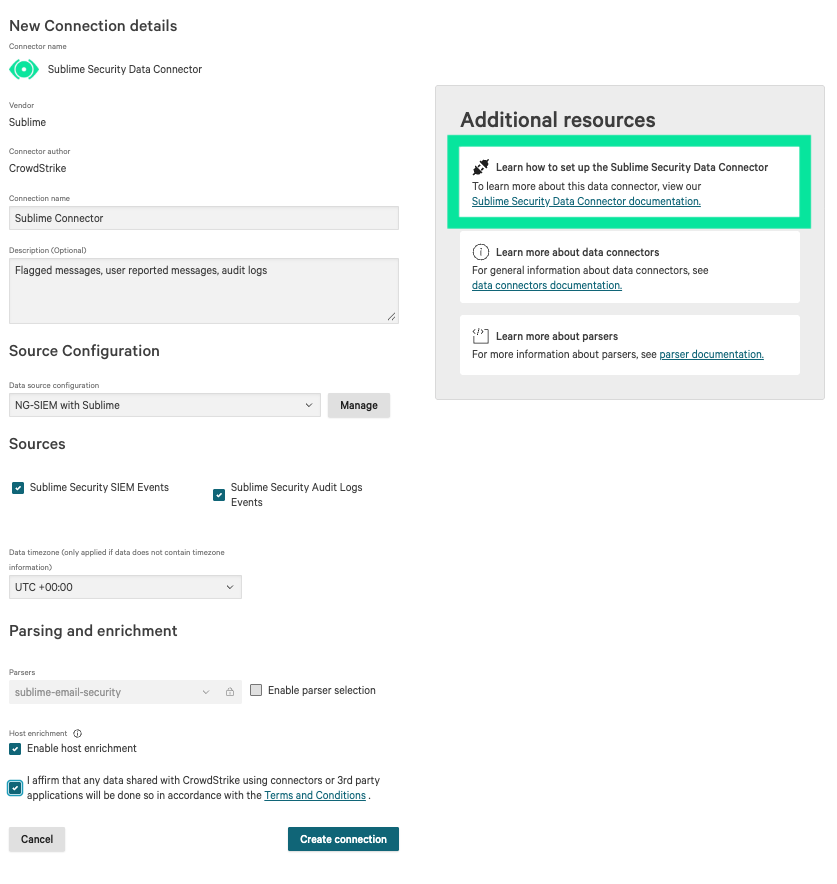
- Give the connection a name. Description is optional.
- For data source configuration, select the Connector Name you created for the Sublime NG-SIEM connector.
- Select the sources to ingest: SIEM events, audit log, or both.
- Leave the parser as-is. The connector ships with a built-in parser.
- Click Create connection.
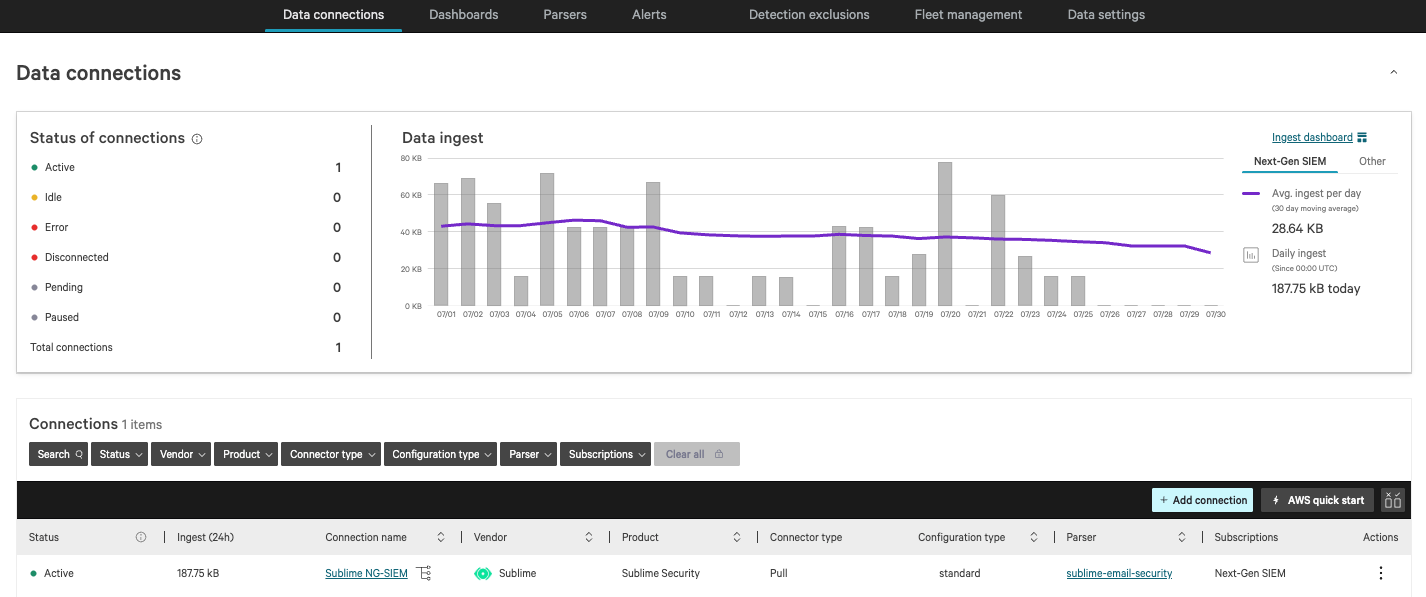
- Reload the page. The connection status changes to Active.
The Add new connector page also links CrowdStrike's own setup guide on the right side of the page, covering configuration and token creation.
Verify events are flowing
- On the Data Connections page, open the three-dot menu at the top right, beside the edit icon.
- Select Show events.
- Confirm you see events, and open one to check the message metadata and verdict are present.
It can take a few minutes for the first events to appear after setup. Large result sets are paginated and may indicate when results are clipped to protect ingest volume.
Tip: reading the raw event. Every event carries a raw string containing the full JSON record. To filter, select a 3PS Sublime Security field on the right side of the event view and click the equals icon beside it. You can also query the raw string directly by appending querygroupBy([@rawstring]), function=count())to the data connection ID in a search.
Checking how much data the connector is ingesting
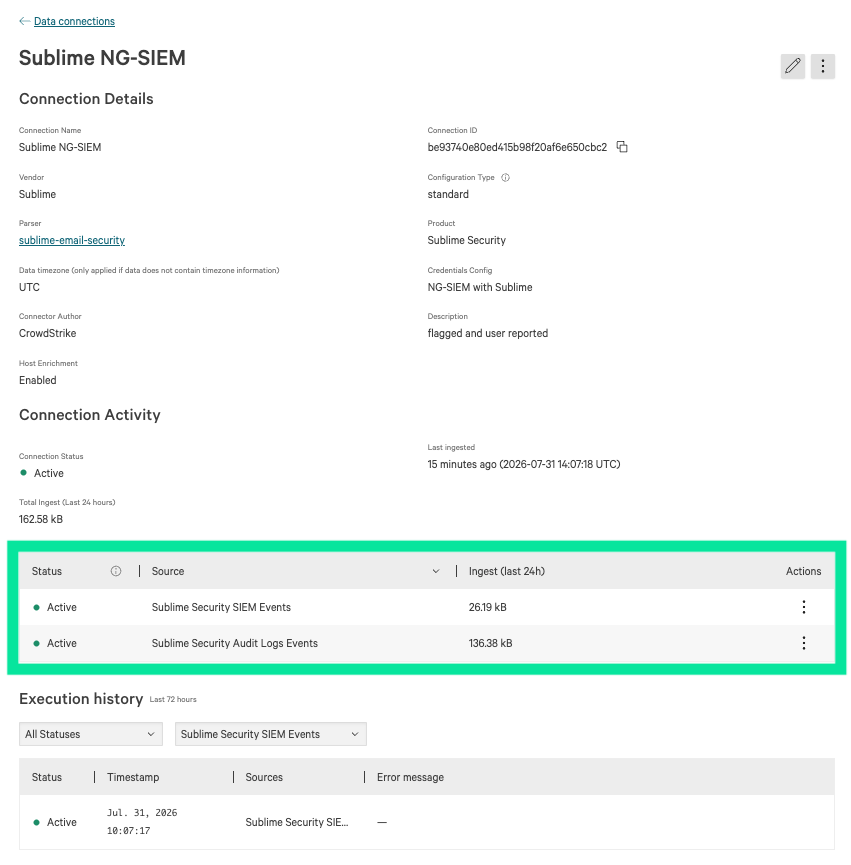
Customers with capped NG-SIEM usage often want to know how much of their ingest is email. From the Data connections page, click the connection name to open it. Ingest volume is shown there.
Troubleshoot the CrowdStrike NG-SIEM integration
Symptom-based fixes for common issues. If you're still stuck, see Get support for the CrowdStrike NG-SIEM integration.
No events appear in Falcon NG-SIEM
- Confirm you created a data connection, not just a configuration. A configuration holds your credentials but does not ingest. Go to Connectors → Data connections and check that a Sublime connection exists and shows Active. See Set up the CrowdStrike Falcon NG-SIEM integration.
- Confirm the connector saved successfully and is enabled in Data onboarding.
- Verify the Base URL matches your Sublime instance exactly, with no trailing slash or typo.
- Allow a few minutes after setup for the first poll to complete.
- Confirm your Sublime instance has recent flagged or user-reported messages to send.
Authentication or token errors
- Generate a new key in Sublime under Automate → API, then re-enter it in the connector. The existing key may be invalid, revoked, or mistyped.
- Confirm the key has not been deleted in Sublime.
Events were flowing but stopped
The connector is built to resume rather than skip. If your Sublime instance or API is briefly unavailable, the connector picks up from where it stopped once it can reach you again, so a short outage should not create a permanent gap. If events are still missing after connectivity is restored, continue below.
- Generate a new API key and update the connector. The previous key was likely rotated or revoked.
- Check the connector's status and health in Falcon for ingestion errors.
Missing fields or partial data
- For very large message groups or messages with many URLs, some fields may be truncated to keep each record within CrowdStrike's ingestion limit. This is expected, not a failure. See What data does the integration send for the field list.
- Confirm the message hasn't aged out of Sublime; some enrichment depends on the message data still being available.
- Verify you're looking at the enriched event (metadata and ASA verdict), not the raw source record.
Rate-limited or clipped results
Large result sets are paginated and may be clipped to protect ingest volume. This is expected. Narrow your search window when investigating.
Checking that a Sublime API key is active
Connector activity is shown as a status under Connectors → Data Connectors.
Get support for the CrowdStrike NG-SIEM integration
This integration is jointly supported by Sublime and CrowdStrike.
Who to contact
- Sublime Support: API connectivity, API key and token validation, rate limits, and questions about the email data and fields.
- CrowdStrike Support: connector installation, data ingestion and parsing, and how events display in Falcon NG-SIEM.
Before contacting support
- Validate API connectivity from Falcon NG-SIEM to your Sublime instance.
- If ingestion errors occur, review the connector logs in the Falcon platform.
- Confirm your Sublime API key is active.
Escalation
For suspected integration defects that span both platforms, a joint escalation path is available between Sublime and CrowdStrike. Contact Sublime Support to open a joint investigation.
Updated 3 months ago